 Spark
Spark
The shift scheduling & calendar app that works with any schedule
Spark puts everything you need to plan your life in one app — tracking sick time, vacation, overtime, and shift trades — and it easily syncs your schedule across multiple devices so you're always up to date.
Effortless, methodical, and on the go
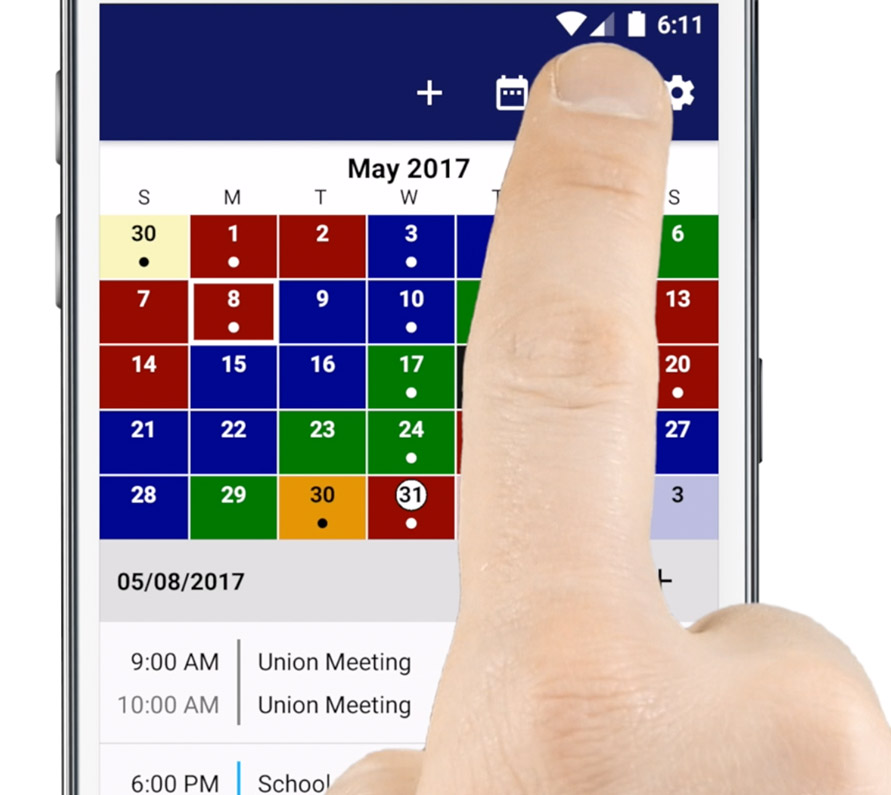
An application organizing your shift work and daily personal needs. Designed with ease and simplicity in mind, we've color-coded days and given you the ability to create custom events with custom symbols — so it's easy to glance at what you have scheduled for the day.
Check out all the features we've jammed into this application and start organizing your life.
Why you'll love Spark
Spark is loaded with features that help you manage your hectic work and personal life.
Organization
With everything you need at your fingertips, Spark makes it easy to schedule all your work and personal times and events.
Learn more →Spark's Cloud Backup
Spark has its own server that keeps your data safe and secure. Lose, break, or upgrade your device — log in and it's all right where you left it.
Learn more →Stat Tracking
Spark keeps all your overtime, vacation, sick, and trade time in one place and up to date — auto-maintained as you enter events.
Learn more →Sync with Google Calendar
Create multiple calendars to track your shift work and keep track of friends and family on the job as well.
Learn more →Packed with everything a shift worker needs
Want to learn more about what everyone is raving about? Here's what Spark has to offer.
- Create your own custom shift cycles (24, 14, 12, 10 and 8 hour shift schedules) or pick from preset schedules.
- Create a Cloud Connect account and have all your data saved and stored securely on our server, so you never lose your data again.
- Manage and keep an accrual log of sick and vacation time.
- Manage and keep track of hours for comp, holiday, and overtime.
- Manage your trades and keep track of hours owed by you or others.
- Sync with Google Calendar.
- Create multiple calendars.
- Be alerted when events are approaching with the notification option.
- Create widgets to easily glance at the day or month.
And there's even more — enter events for:
"I've had this app for many years. Recently had an issue with restoring my yearly subscription after making payment. Reached out to support, got a response within an hour and was back to full access. Works great especially for a rotating chart."
"This is an awesome app to help with the weird schedules of firemen everywhere. I can look up dates that my husband is available. When you have more than one person in the family in emergency services, this is a must have."
"I've been using this app since 2016 and it's a public safety (especially firefighters) must. The app and support are spot on — Matt immediately got back with me and that's why I'll be a customer for life."
"The best police app I've ever used. Easy to track swaps, comp time, OT, etc."
"I love this app for my rotating shifts. There's so many features that allow me to personalize exactly what I need to do. I have my schedule along with my other workers all in one place. Literally a life saver!"
"I have been using this app for years to manage my work schedule as well as overtime, tour changes, and time off. I integrate my Apple calendar to never miss an event. Extremely easy to navigate and set up."
"Only one I'll ever use. I've been using it for years. Firefighter proof!"
"I love being able to look ahead months and even years to see what holidays/dates my platoon may be working. I recently experienced an issue and the customer service was fantastic and quick. Highly recommend!"
"Best schedule app I have found so far. Lets you customize your schedule. Very easy to keep track of vacation, sick leave and even exposure tracking. Customer service is top notch."
News & press
Spark in the press, plus tips and comparisons for shift workers.
Top 5 Shift Calendar Apps for Shift Workers: Which One Stands Out?
Read more →Local Firefighter Finds Success with Launch of Phone Application
Read more →Firefighter Creates Smartphone App to Deal with Schedules
Read more →Firehouse Scheduler Helps Simplify Lives for Firefighters
Read more →Frequently asked questions
How do I set up and enter my work schedule/cycle?
You'll start with the first day of your cycle and enter it through to the last day of your cycle, then stop. Then enter the start date as the first day you work when starting that cycle.
Example: with a 3-on, 4-off schedule, you'd start with the first day you work coming off your 4 days off and enter it through to the last day of your 4 days off, then stop — a total of 9 entries. Then enter the start date as the first day you work coming off your 4 days off. If you need further assistance, please contact support.
How does Cloud Connect work?
Create a Cloud Connect account and Spark saves and stores all your data securely on our server. If you lose, break, or upgrade your device, simply log back in and everything is right where you left it.
Once I create an account, can I log in on multiple devices with the same subscription?
With a Cloud Connect account, your schedule syncs across the devices you log into. If you run into any limits for your plan, our support team can help sort out the details.
If I switched from Android to iPhone (or vice versa), do I need to buy the app/subscription again?
Subscriptions are managed through the app store you purchased from, so switching platforms may require a new purchase there. Contact support and we'll help move your data over with Cloud Connect.
How does Calendar Transfer work?
Calendar Transfer moves your schedule data between devices or accounts through Cloud Connect — log in on the new device and your calendar syncs automatically.
If you need further assistance, please contact support.
Don't hesitate to get in touch
Please fill out this form and we will review your questions or issue and have someone get back to you as soon as we can. Thank you.
Create multiple calendars not only to keep track of your shift work but also keep track of friends and family on the job as well.